Saturday, January 13, 2018

Connecting to Oracle Instance

Connecting to an Oracle Instance (User Process & Server Process)


Before users can submit SQL statements to an Oracle database, they must connect to an instance.

User Process: 
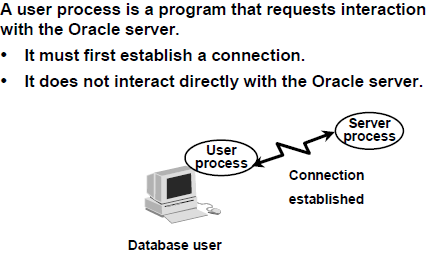
User_process
A database user who needs to request information from the database must first make a connection with the Oracle server. The connection is requested using a database interface tool, such as SQL*Plus, and beginning the user process. The user process does not interact directly with the Oracle server. Rather it generates calls through the user program interface (UPI), which creates a session and starts a server process.

Server Process:
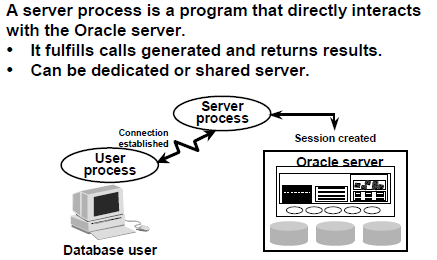
server_process

Once a user has established a connection, a server process is started to handle the user processes requests. A server process can be either a dedicated server process or a shared server process. In a dedicated server environment, the server process handles the request of a single user process. Once a user process disconnects, the server process is terminated. In a shared server environment, the server process handles the request of several user processes.The server process communicates with the Oracle server using the Oracle Program Interface.

Connecting to an Oracle Instance:

The user starts a tool such as SQL*Plus,sql developer,toad or runs an application developed using a tool such as Oracle Forms. This application or tool is executed as a user process.
In the most basic configuration, when a user logs on to the Oracle server, a process is created on the computer running the Oracle server. This process is called a server process. The server process communicates with the Oracle instance on behalf of the user process that runs on the client. The server process executes SQL statements on behalf of the user.
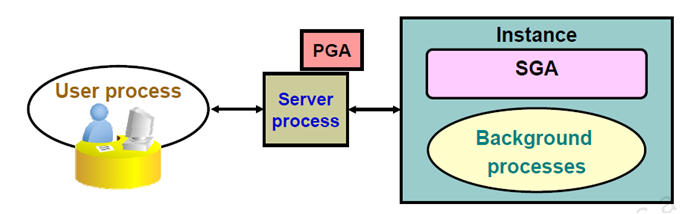
user_connection2

User Process is started at the time a database user request  a connection to the oracle server .Server Process connect to the oracle instance and started when a user establish a session .
user process & server process are used to manage the execution of sql/plsql statements.
one-to-one correspondence between the User and Server Processes. This is called a Dedicated Server connection. An alternative configuration is to use a Shared Server where more than one User Process shares a Server Process.
Server Process is the go-between for a Client Process and the Oracle Instance.

Dedicated Server environment – there is a single Server Process to serve each Client Process.

Shared Server environment – a Server Process can serve several User Processes, although with some performance reduction

Connection

A connection is a communication pathway between a user process and an Oracle server. A database user can connect to an Oracle server using tool, sqlplus etc.

Sessions

A session is a specific connection of a user to an Oracle server. The session starts when the user is validated by the Oracle server, and it ends when the user logs out or when there is an abnormal termination. For a given database user, many concurrent sessions are possible if the user logs on from many tools, applications, or terminals at the same time.
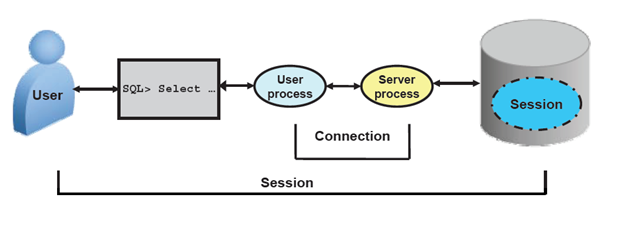
user_connection3

PGA(Program Global Area)

Oracle instance consists of SGA and oracle processes. Oracle processes can be divided into server processes and background processes. Oracle database uses background processes to perform overall database operations, for example, database writer process writes dirty buffer from database buffer cache to datafiles. Oracle creates one or more Server Processes for users connected to database. Each oracle process is assigned a memory area to contain data and control information. This memory area is called Program Global Area (PGA).

The Program Global Area (PGA) is a private memory region that contains the data and control information for a server process. Only a server process can access the PGA. Oracle Database reads and writes information in the PGA on behalf of the server process. it will allocate depend upon connection type :
Dedicated Server environment – the Private SQL Area is located in the Program Global Area (PGA).
Shared Server environment – the Private SQL Area is located in the System Global Area (SGA).
PGA

A PGA is:

  • a non-shared memory region that contains data and control information exclusively for use by an Oracle process.
  • One PGA exists for each Server Process and each Background Process. It stores data and control information for a single Server Process or a single Background Process.
  • PGA is the memory reserved for each user process connecting to an Oracle Database and is allocated when a process is created and deallocated when a process is terminated.
  • This is NOT a shared part of memory – one PGA to each process only.
  • The collection of individual PGAs is the total instance PGA, or instance PGA.


Contents of  PGA:-

Oracle database creates server processes to mange requests of user process. All user process issues SQL statements, it is the responsibility of Server process to execute these statements and return results to user process. Each server process has one PGA. PGA is memory where server process executes statements and stores information.

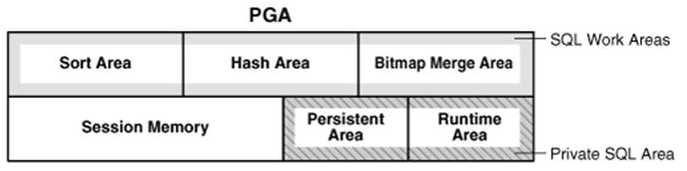
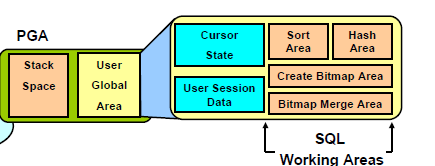
PGA consists of:

  • Private SQL Area
  • session memory
  • SQL work Areas

Private SQL Area: Contains data such as bind information and run-time memory structures. It contains Persistent Area which contains bind information and is freed only when the cursor is closed and Run time Area which is created as the first step of an execute request. This area is freed only when the statement has been executed. The number of Private SQL areas that can be allocated to a user process depends on the OPEN_CURSORS initialization parameter. The location of a private SQL area depends on the type of connection established for a session. If a session is connected through a dedicated server, private SQL areas are located in the server process's PGA. However, if a session is connected through a shared server, part of the private SQL area is kept in the SGA.

Session Memory: Consists of memory allocated to hold a session’s variable and other info related to the session information for example session variables and logon information

SQL Work Areas: Used for memory intensive operations such as: Sort-based operators (order by, group-by, rollup, window function) ,Hash-join, Bitmap merge, Bitmap Create
PGA

ARCN (Archiver Process)

ARCN
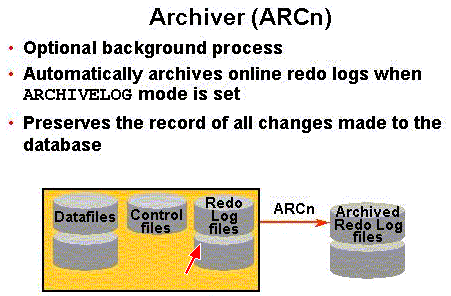
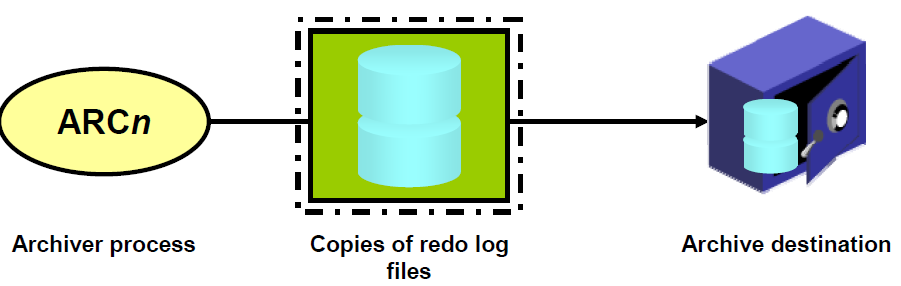
The archiver process (ARCn) copies redo log files to a designated storage device after a log switch has occurred. ARCn processes are present only when the database is in ARCHIVELOG mode, and automatic archiving is enabled ARCn Responsible for copying online redo log to archival storage before being reused. Runs only when database is in Archivelog Mode.When a Redo Log File fills up, Oracle switches to the next Redo Log File.

  • If all Redo Log Files fill up, then Oracle switches back to the first one and uses them in a round-robin fashion by overwriting ones that have already been used.
  • Overwritten Redo Log Files have information that, once overwritten, is lost forever.

ARCN_1

ARCHIVELOG Mode:


  • If ARCn is in what is termed ARCHIVELOG mode, then as the Redo Log Files fill up, they are individually written to Archived Redo Log Files.
  • LGWR does not overwrite a Redo Log File until archiving has completed.
  • Committed data is not lost forever and can be recovered in the event of a disk failure.
  • Only the contents of the SGA will be lost if an Instance fails.


 NOARCHIVELOG Mode:

  • The Redo Log Files are overwritten and not archived.
  •  Recovery can only be made to the last full backup of the database files.
  • All committed transactions after the last full backup are lost, and you can see that this could cost the firm a lot of $$$.


When running in ARCHIVELOG mode, the DBA is responsible to ensure that the Archived Redo Log Files do not consume all available disk space! Usually after two complete backups are made, any Archived Redo Log Files for prior backups are deleted.

Complex Oracle 19c to PostgreSQL 15 Database Migration

Production-oriented migration approach for a complex Oracle 19c to PostgreSQL 15 workload , covering assessment, schema and code conversion,...