ADD HARD DISK IN LINUX USING VIRTUAL BOX
====================================================================
=======================================================
===============================

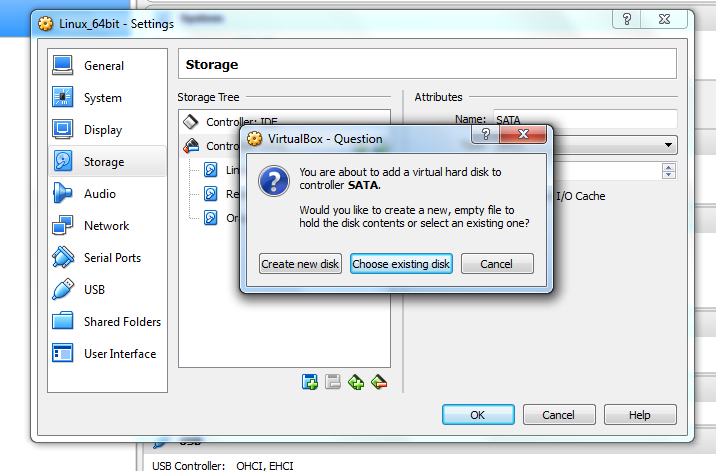


Login as ROOT user
===================================
[root@test ~]# df -h
Filesystem Size Used Avail Use% Mounted on
/dev/mapper/vg_test-lv_root 8.3G 5.1G 2.8G 65% /
tmpfs 2.0G 76K 2.0G 1% /dev/shm
/dev/sda1 477M 55M 397M 13% /boot
/dev/sdb1 9.8G 3.7G 5.6G 40% /repo
[root@test ~]#
[root@test ~]#
[root@test ~]# fdisk -l
Disk /dev/sda: 12.9 GB, 12884901888 bytes
255 heads, 63 sectors/track, 1566 cylinders
Units = cylinders of 16065 * 512 = 8225280 bytes
Sector size (logical/physical): 512 bytes / 512 bytes
I/O size (minimum/optimal): 512 bytes / 512 bytes
Disk identifier: 0x00095f55
Device Boot Start End Blocks Id System
/dev/sda1 * 1 64 512000 83 Linux
Partition 1 does not end on cylinder boundary.
/dev/sda2 64 1567 12069888 8e Linux LVM
Disk /dev/sdb: 10.8 GB, 10766991360 bytes
255 heads, 63 sectors/track, 1309 cylinders
Units = cylinders of 16065 * 512 = 8225280 bytes
Sector size (logical/physical): 512 bytes / 512 bytes
I/O size (minimum/optimal): 512 bytes / 512 bytes
Disk identifier: 0xc71cec29
Device Boot Start End Blocks Id System
/dev/sdb1 1 1309 10514511 83 Linux
Disk /dev/sdc: 12.9 GB, 12884901888 bytes
255 heads, 63 sectors/track, 1566 cylinders
Units = cylinders of 16065 * 512 = 8225280 bytes
Sector size (logical/physical): 512 bytes / 512 bytes
I/O size (minimum/optimal): 512 bytes / 512 bytes
Disk identifier: 0x00000000
Disk /dev/mapper/vg_test-lv_root: 9122 MB, 9122611200 bytes
255 heads, 63 sectors/track, 1109 cylinders
Units = cylinders of 16065 * 512 = 8225280 bytes
Sector size (logical/physical): 512 bytes / 512 bytes
I/O size (minimum/optimal): 512 bytes / 512 bytes
Disk identifier: 0x00000000
Disk /dev/mapper/vg_test-lv_swap: 3145 MB, 3145728000 bytes
255 heads, 63 sectors/track, 382 cylinders
Units = cylinders of 16065 * 512 = 8225280 bytes
Sector size (logical/physical): 512 bytes / 512 bytes
I/O size (minimum/optimal): 512 bytes / 512 bytes
Disk identifier: 0x00000000
[root@test ~]#
[root@test ~]# fdisk /dev/sdc
Device contains neither a valid DOS partition table, nor Sun, SGI or OSF disklabel
Building a new DOS disklabel with disk identifier 0x9595adae.
Changes will remain in memory only, until you decide to write them.
After that, of course, the previous content won't be recoverable.
Warning: invalid flag 0x0000 of partition table 4 will be corrected by w(rite)
WARNING: DOS-compatible mode is deprecated. It's strongly recommended to
switch off the mode (command 'c') and change display units to
sectors (command 'u').
Command (m for help): p
Disk /dev/sdc: 12.9 GB, 12884901888 bytes
255 heads, 63 sectors/track, 1566 cylinders
Units = cylinders of 16065 * 512 = 8225280 bytes
Sector size (logical/physical): 512 bytes / 512 bytes
I/O size (minimum/optimal): 512 bytes / 512 bytes
Disk identifier: 0x9595adae
Device Boot Start End Blocks Id System
Command (m for help): n
Command action
e extended
p primary partition (1-4)
p
Partition number (1-4): 1
First cylinder (1-1566, default 1):
Using default value 1
Last cylinder, +cylinders or +size{K,M,G} (1-1566, default 1566):
Using default value 1566
Command (m for help): p
Disk /dev/sdc: 12.9 GB, 12884901888 bytes
255 heads, 63 sectors/track, 1566 cylinders
Units = cylinders of 16065 * 512 = 8225280 bytes
Sector size (logical/physical): 512 bytes / 512 bytes
I/O size (minimum/optimal): 512 bytes / 512 bytes
Disk identifier: 0x9595adae
Device Boot Start End Blocks Id System
/dev/sdc1 1 1566 12578863+ 83 Linux
Command (m for help): w
The partition table has been altered!
Calling ioctl() to re-read partition table.
Syncing disks.
[root@test ~]#
[root@test ~]#
[root@test ~]# mkfs.ext4 /dev/sdc1
mke2fs 1.43-WIP (20-Jun-2013)
Filesystem label=
OS type: Linux
Block size=4096 (log=2)
Fragment size=4096 (log=2)
Stride=0 blocks, Stripe width=0 blocks
786432 inodes, 3144715 blocks
157235 blocks (5.00%) reserved for the super user
First data block=0
Maximum filesystem blocks=3221225472
96 block groups
32768 blocks per group, 32768 fragments per group
8192 inodes per group
Superblock backups stored on blocks:
32768, 98304, 163840, 229376, 294912, 819200, 884736, 1605632, 2654208
Allocating group tables: done
Writing inode tables: done
Creating journal (32768 blocks): done
Writing superblocks and filesystem accounting information: done
[root@test ~]#
[root@test ~]# cd /
[root@test /]# mkdir /u01
[root@test /]#
[root@test /]# mount -t ext4 /dev/sdc1 /u01
[root@test /]#
[root@test /]# df -h
Filesystem Size Used Avail Use% Mounted on
/dev/mapper/vg_test-lv_root 8.3G 5.1G 2.8G 65% /
tmpfs 2.0G 76K 2.0G 1% /dev/shm
/dev/sda1 477M 55M 397M 13% /boot
/dev/sdb1 9.8G 3.7G 5.6G 40% /repo
/dev/sdc1 12G 30M 12G 1% /u01
[root@test /]#
[root@test /]# vi /etc/fstab
[root@test /]#
[root@test /]# cat etc/fstab
#
# /etc/fstab
# Created by anaconda on Sun Feb 21 22:08:33 2016
#
# Accessible filesystems, by reference, are maintained under '/dev/disk'
# See man pages fstab(5), findfs(8), mount(8) and/or blkid(8) for more info
#
/dev/mapper/vg_test-lv_root / ext4 defaults 1 1
UUID=2f39e521-c679-45a8-899b-3e4facdb6fd7 /boot ext4 defaults 1 2
/dev/mapper/vg_test-lv_swap swap swap defaults 0 0
tmpfs /dev/shm tmpfs defaults 0 0
devpts /dev/pts devpts gid=5,mode=620 0 0
sysfs /sys sysfs defaults 0 0
proc /proc proc defaults 0 0
/dev/sdb1 /repo ext4 defaults 1 2
/dev/sdc1 /u01 ext4 defaults 1 2
[root@test /]#


No comments:
Post a Comment