Saturday, February 27, 2016

ORA-23515: materialized views and/or their indices exist in the tablespace


Make list of  MATERIALIZED  view:
===================================


select 'drop materialized view  '|| a.owner||'.'|| a.object_name || ';' from dba_objects a ,dba_segments b where a.OWNER=b.OWNER and b.TABLESPACE_NAME='MGMT_TABLESPACE'  and object_type='MATERIALIZED VIEW';
drop materialized view SYSMAN.MGMT$ARU_PATCH_RECOM_MD;

About the Author : Anurag Pandey | Database cloud Architect | Oracle | SQL Server | PostgreSQL | AI and Data Platform Enthusiast

Anurag Pandey is a Database Architect with expertise in Oracle, PostgreSQL, SQL Server, Linux, and enterprise database platforms and specializes in database architecture, performance tuning, high availability, disaster recovery, cloud modernization, and operational excellence. With extensive experience in enterprise-scale environments, Anurag is passionate about leveraging AI, automation, and modern data platforms to improve reliability, scalability, and business outcomes. He actively contributes to technical communities through knowledge sharing, architecture guidance, and thought leadership in database and data engineering domains.

Follow more articles at

Visit Blog

ORA-24005: Inappropriate utilities used to perform DDL on AQ table

SQL> drop table SYSMAN.MGMT_LOADER_QTABLE cascade constraints;
                  *
ERROR at line 1:
ORA-24005: Inappropriate utilities used to perform DDL on AQ table SYSMAN.MGMT_LOADER_QTABLE


execute DBMS_AQADM.DROP_QUEUE_TABLE (queue_table => 'SYSMAN.MGMT_NOTIFY_INPUT_QTABLE', force => true);

select 'execute DBMS_AQADM.DROP_QUEUE_TABLE (queue_table => ' ||owner||'.'||table_name||' , force => true) ;' from dba_LOBS WHERE TABLESPACE_NAME='MGMT_TABLESPACE';

About the Author : Anurag Pandey | Database cloud Architect | Oracle | SQL Server | PostgreSQL | AI and Data Platform Enthusiast

Anurag Pandey is a Database Architect with expertise in Oracle, PostgreSQL, SQL Server, Linux, and enterprise database platforms and specializes in database architecture, performance tuning, high availability, disaster recovery, cloud modernization, and operational excellence. With extensive experience in enterprise-scale environments, Anurag is passionate about leveraging AI, automation, and modern data platforms to improve reliability, scalability, and business outcomes. He actively contributes to technical communities through knowledge sharing, architecture guidance, and thought leadership in database and data engineering domains.

Follow more articles at

Visit Blog

Deleted Central Inventory : Re - Create Inventory in Oracle 11gr2

Login As Oracle user

su - oracle

[oracle@test~]$
[oracle@test~]$
[oracle@test~]$ echo $ORACLE_HOME
/u01/app/oracle/product/11.2.0/db_1
[oracle@test~]$ echo $ORACLE_SID
TEST
[oracle@test~]$ echo $ORACLE_BASE
/u01/app/oracle
[oracle@test~]$


[oracle@test bin]$
[oracle@test bin]$ pwd
/u01/app/oracle/product/11.2.0/db_1/oui/bin
[oracle@test bin]$
[oracle@test bin]$ ls
addLangs.sh  attachHome.sh  filesList.bat         filesList.sh  resource      runInstaller     runSSHSetup.sh
addNode.sh   detachHome.sh  filesList.properties  lsnodes       runConfig.sh  runInstaller.sh
[oracle@test bin]$
[oracle@test bin]$
[oracle@test bin]$
[oracle@test app]$ ls
Make  oraInventory  oraInventory_old
[oracle@test app]$ ls
oracle    oraInventory_old
[oracle@test app]$
[oracle@test app]$
[oracle@test app]$

=======Attach Oracle Home=================

[oracle@test bin]$ ./runInstaller -silent -attachHome -invPtrLoc /etc/oraInst.loc oracle_home="/u01/app/oracle/product/11.2.0/db_1" ORACLE_HOME_NAME="OraDb11g_home1"
Starting Oracle Universal Installer...

Checking swap space: must be greater than 500 MB.   Actual 2999 MB    Passed
Preparing to launch Oracle Universal Installer from /tmp/OraInstall2016-02-27_11-46-02AM. Please wait ...[oracle@test bin]$ The inventory pointer is located at /etc/oraInst.loc
The inventory is located at /u01/app/oraInventory
'AttachHome' was successful.

[oracle@test bin]$
[oracle@test bin]$
[oracle@test bin]$


====================Attach Grid Home=======================

Login as grid user

su - grid


[grid@e@test ~] cd /u01/app/11.2.0/grid/oui/bin/

[grid@e@test bin ~]$ ./runInstaller -silent -attachHome -invPtrLoc /etc/oraInst.loc oracle_home="/u01/app/oracle/11.2.0/grid" ORACLE_HOME_NAME="Ora11g_gridinfrahome1" 
Starting Oracle Universal Installer…
Checking swap space: must be greater than 500 MB.   Actual 2999 MB    Passed 
The inventory pointer is located at /etc/oraInst.loc 
The inventory is located at /u01/app/oraInventory 
‘AttachHome’ was successful.

About the Author : Anurag Pandey | Database cloud Architect | Oracle | SQL Server | PostgreSQL | AI and Data Platform Enthusiast

Anurag Pandey is a Database Architect with expertise in Oracle, PostgreSQL, SQL Server, Linux, and enterprise database platforms and specializes in database architecture, performance tuning, high availability, disaster recovery, cloud modernization, and operational excellence. With extensive experience in enterprise-scale environments, Anurag is passionate about leveraging AI, automation, and modern data platforms to improve reliability, scalability, and business outcomes. He actively contributes to technical communities through knowledge sharing, architecture guidance, and thought leadership in database and data engineering domains.

Follow more articles at

Visit Blog

Monday, February 22, 2016

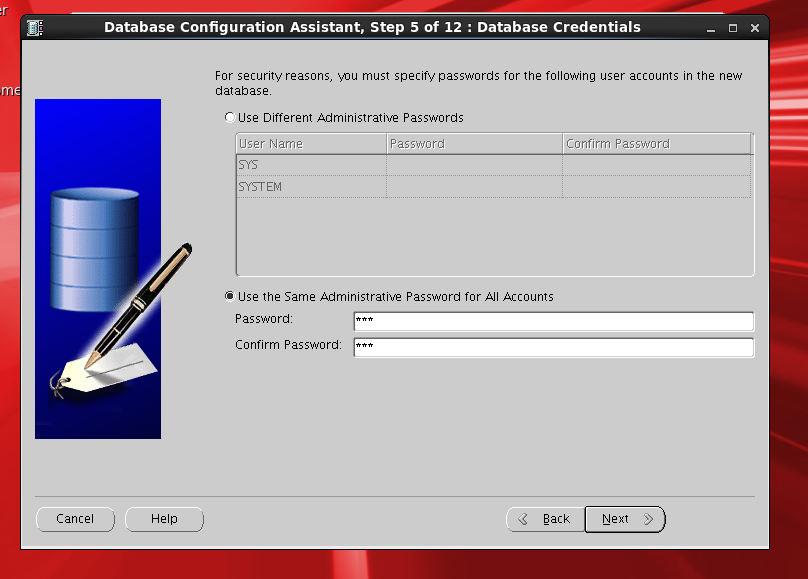
Create Database using DBCA in 11gr2


CREATE DATABASE USING DBCA
===========================================================
==============================
=================


Login as oracle user

[oracle@test ~]$ dbca
or
[oracle@test ~]$ cd /u01/app/oracle/product/11.2.0/db_1/bin
[oracle@test ~]$ ./dbca


About the Author : Anurag Pandey | Database cloud Architect | Oracle | SQL Server | PostgreSQL | AI and Data Platform Enthusiast

Anurag Pandey is a Database Architect with expertise in Oracle, PostgreSQL, SQL Server, Linux, and enterprise database platforms and specializes in database architecture, performance tuning, high availability, disaster recovery, cloud modernization, and operational excellence. With extensive experience in enterprise-scale environments, Anurag is passionate about leveraging AI, automation, and modern data platforms to improve reliability, scalability, and business outcomes. He actively contributes to technical communities through knowledge sharing, architecture guidance, and thought leadership in database and data engineering domains.

Follow more articles at

Visit Blog

Oracle Database Deep Health Check Checklist

Oracle Database Deep Health Check Checklist Recommended assessment levels Level Purpose Typical scope L1 Operational health Availability, sp...