Saturday, January 13, 2018

Oracle Background Process

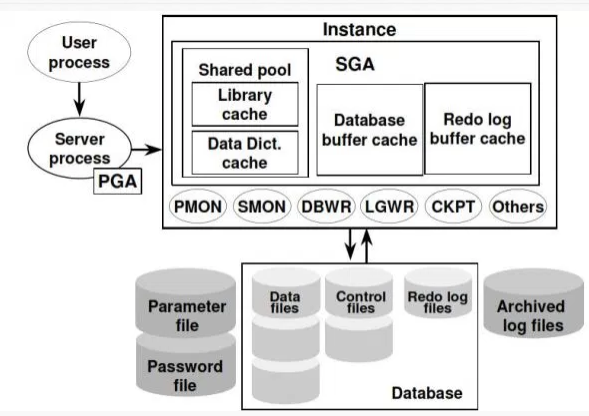
To maximize the performance and accommodate many users, a multiprocessing oracle system use some additional database process called background process.
The relationship between the physical and memory structures is maintained and enforced by Oracle’s background processes.

Mandatory background process :
  • System monitor (SMON)
  • Process monitor (PMON)
  • Database writer (DBWR)
  • Log writer (LGWR)
  • Checkpoint (CKPT)
Optional process:
  • Archival  (ARCn)

What is Oracle Database

Oracle database is a collection of data treated as a unit. The purpose of a database is to store and retrieve related information.
A database server is the key to solving the problems of information management which can be to efficiently retrieved, updated and analyzed and authenticated .
A database is a collection of information that is organized so that it can be easily accessed, managed and updated.
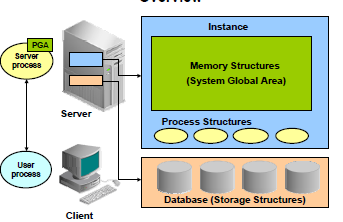
Oracle Database Architecture consists of following three main structures:
  • Storage Structure
  • Memory Structure
  • Process Structure
When a database is created, database files are created. These files include Control files, Data files, online redo log files, parameter file and password file. All these files
formulate “Storage Structure”.

DB_stru

When oracle Database is started on Database Server, oracle software allocates shared memory area and also starts several processes to run database. The shared memory area is called System Global Area (SGA).The combination of System Global Area and background Processes is known as Oracle Instance. Oracle Instance formulates Memory Structure and Process Structure.Each instance in oracle server is associated with a specific database. The process of assigning an instance to a database is called Mounting. After mounting, database is opened and becomes accessible for users. Multiple instances can run on single computer.

In RAC (Real Application Cluster)  more than one  instance point to single database.

                                  Instance=SGA + Background process


DB

Wednesday, December 27, 2017

Resolving TNS – Message 3511 not found

C:\Users\Administrator.ANURAG-PC>tnsping ducat

TNS Ping Utility for 32-bit Windows: Version 11.2.0.1.0 - Production on 27-DEC-2017 21:46:23

Copyright (c) 1997, 2010, Oracle.  All rights reserved.

Message 3511 not found; No message file for product=NETWORK, facility=TNSTNS-03505: Message 3505 not found; No message file for product=NETWORK, facility=TNS

C:\Users\Administrator.ANURAG-PC>set ORACLE_BASE=D:\app\ANURAG

C:\Users\Administrator.ANURAG-PC>tnsping ducat

TNS Ping Utility for 32-bit Windows: Version 11.2.0.1.0 - Production on 27-DEC-2017 21:53:16

Copyright (c) 1997, 2010, Oracle.  All rights reserved.

Message 3511 not found; No message file for product=NETWORK, facility=TNSTNS-03505: Message 3505 not found; No message file for product=NETWORK, facility=TNS

C:\Users\Administrator.ANURAG-PC>set ORACLE_HOME=D:\app\ANURAG\product\11.2.0\client_1

C:\Users\Administrator.ANURAG-PC>


Solution
=============

C:\Users\Administrator.ANURAG-PC>set ORACLE_BASE=D:\app\ANURAG

C:\Users\Administrator.ANURAG-PC>tnsping ducat

TNS Ping Utility for 32-bit Windows: Version 11.2.0.1.0 - Production on 27-DEC-2017 21:53:16

Copyright (c) 1997, 2010, Oracle.  All rights reserved.

Message 3511 not found; No message file for product=NETWORK, facility=TNSTNS-03505: Message 3505 not found; No message file for product=NETWORK, facility=TNS

C:\Users\Administrator.ANURAG-PC>set ORACLE_HOME=D:\app\ANURAG\product\11.2.0\client_1

C:\Users\Administrator.ANURAG-PC>
C:\Users\Administrator.ANURAG-PC>tnsping ducat

TNS Ping Utility for 32-bit Windows: Version 11.2.0.1.0 - Production on 27-DEC-2017 21:53:44

Copyright (c) 1997, 2010, Oracle.  All rights reserved.

Used parameter files:
D:\app\ANURAG\product\11.2.0\client_1\network\admin\sqlnet.ora


Used TNSNAMES adapter to resolve the alias
Attempting to contact (DESCRIPTION = (ADDRESS_LIST = (ADDRESS = (PROTOCOL = TCP)(HOST = 192.168.1.48)(PORT = 1521))) (CONNECT_DATA = (SERVICE_NAME = ducat)))
OK (0 msec)

C:\Users\Administrator.ANURAG-PC>

Complex Oracle 19c to PostgreSQL 15 Database Migration

Production-oriented migration approach for a complex Oracle 19c to PostgreSQL 15 workload , covering assessment, schema and code conversion,...